It’s 10:47 AM. Your lunch rush is about to hit, and suddenly your POS system freezes. Or your drive-thru speaker cuts out. Or you discover you’re short on a key ingredient. What should have been your most profitable hour becomes a scramble to fix preventable problems — the kind a proper restaurant opening checklist is designed to catch before service begins.
Here’s the frustrating truth: most QSR disasters aren’t unpredictable. They’re completely avoidable. That frozen POS? It’s been running slowly for three days. The speaker’s issue? Static has been getting worse all week. The missing ingredient? Your opening manager didn’t verify the delivery.
We’ve identified a pattern. The difference between restaurants that run smoothly and those that constantly fight fires isn’t luck, staff quality, or equipment age. It’s a simple 15-minute morning routine that catches problems before they become emergencies.
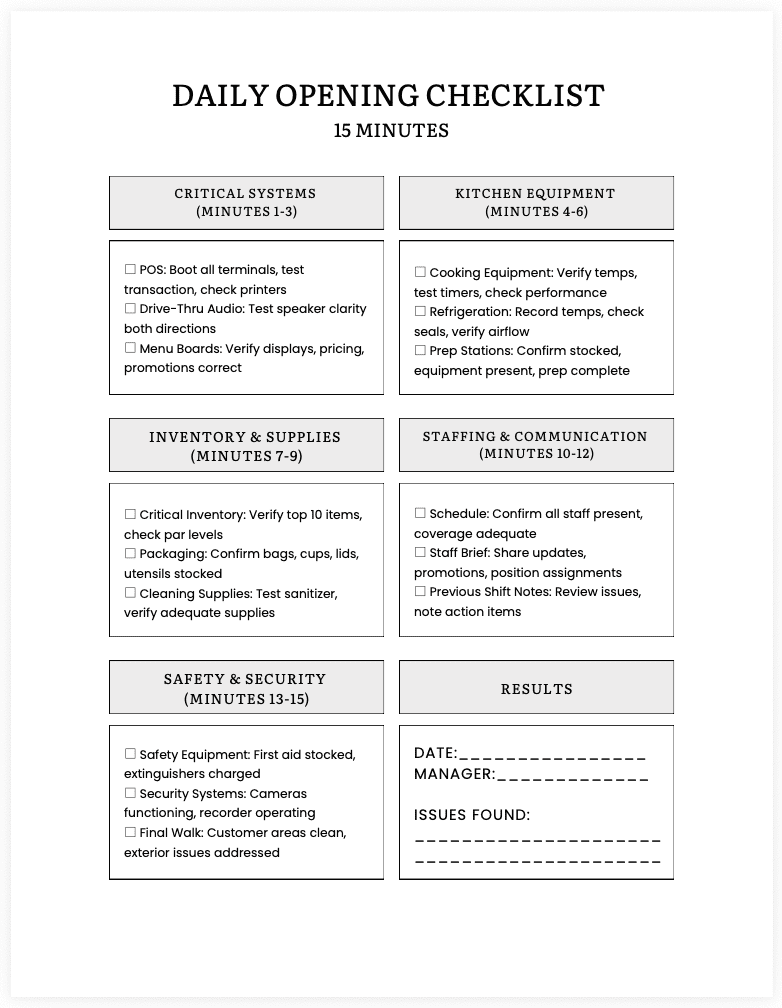
This article gives you that exact checklist. Print it, laminate it, and make it part of your opening procedure. Fifteen minutes of focused attention each morning will save you hours of chaos and thousands in lost revenue.
Download the 15-Minute Daily Opening Checklist PDFWhy This Morning Routine Matters
A POS that’s “running a bit slow” crashes during lunch, costing 45 minutes of downtime and $600+ in lost sales. A drive-thru speaker with “a little static” frustrates 50 customers who leave before ordering, resulting in $400 in missed revenue. A prep station that “seems fine” breaks down mid-rush, adding 2 minutes to every order for three hours.
Equipment failures during peak hours cost QSRs an average of $500-1,500 per incident. That’s immediate lost revenue, plus frustrated customers who don’t return. According to the 2024 Intouch Insight Drive-Thru Study, most of these failures show warning signs 1 to 2 days before they occur.
The checklist below catches those warning signs. Each item takes 1-2 minutes and prevents problems that could cost hundreds or thousands of dollars.
The 15-Minute Checklist (Step by Step)
Here’s your daily routine. Assign this to your opening manager and make it non-negotiable. The entire sequence takes 12-15 minutes when done efficiently.
Minutes 1-3: Critical Systems Test
POS System Check (90 seconds)
- Boot up all terminals and verify speed.
- Process a test transaction on each register.
- Check the receipt printer paper levels and print quality.
- Verify payment processing with a test card swipe.
- Confirm all menu items display correctly.
Red flags: Terminals taking over 15 seconds to process transactions, intermittent error messages, faded printer output.
Why it matters: Catching POS issues in the morning prevents costly lunch-rush failures. For more on recognizing problems early, see 5 Signs Your POS System Is Holding You Back.
Drive-Thru Audio Test (60 seconds)
- Test speaker clarity from a car (or have someone stand at the board)
- Verify you can hear clearly in both directions.
- Check for static, cutting out, or volume issues.
- Confirm headset functionality for order-takers
Red flags: Static, crackling, or voices cutting out.
Why it matters: Poor audio adds 8-12 seconds per order and reduces accuracy by 15%. The 2024 QSR Drive-Thru Report shows that clear audio can improve service times by nearly a full minute. Learn more in The Drive-Thru Audio Crisis Nobody’s Talking About.
Menu Board Verification (30 seconds)
- Verify all digital displays are functioning.
- Check that current pricing and promotions display correctly.
- Confirm brightness is appropriate for current conditions.
- Note any flickering, dead pixels, or outdated content.
Red flags: Flickering displays, outdated pricing, handwritten additions over digital content.
Why it matters: Menu board issues add 15-20 seconds to customer decision-making time and lead to pricing disputes.
Minutes 4-6: Kitchen Equipment Verification
Cooking Equipment Check (90 seconds)
- Verify all grills, fryers, and ovens reached the proper temperature.
- Check for unusual sounds, smells, or behaviors.
- Test timer systems on critical equipment
- Confirm temperature displays match actual performance.
Red flags: Slow heating, temperature fluctuations, unusual noises or smells.
Why it matters: Equipment failure during peak hours can cost $2,000+ in lost sales and force menu restrictions.
Refrigeration Check (60 seconds)
- Record temperatures for all coolers and freezers
- Verify door seals are intact and closing properly.
- Check for any frost buildup or condensation.
- Confirm nothing is blocking ventilation.
Red flags: Temperatures outside safe ranges (coolers above 40°F, freezers above 0°F), poor door seals, frost buildup.
Why it matters: Refrigeration failure means throwing out thousands of dollars in inventory and lost sales during sourcing replacements.
Prep Station Setup (60 seconds)
- Verify all prep areas are stocked with essentials.
- Check that portioning tools are present and working.
- Confirm prep list items are completed.
- Note any missing equipment or supplies.
Red flags: Missing critical items, incomplete prep tasks, misplaced equipment.
Why it matters: Missing prep items add 20-30 seconds per order during service.
Minutes 7-9: Inventory and Supply Verification
Critical Inventory Spot Check (90 seconds)
- Verify that your top 10-selling items have adequate stock levels.
- Check par levels for key ingredients used in multiple items.
- Confirm backup supplies for fast-moving items.
- Note anything running lower than expected.
Red flags: Stock levels below 2 hours of peak service, missing delivery items, unusual usage.
Why it matters: Each “we’re out of that” costs an estimated $8-12 in lost or reduced orders.
Supplies and Packaging Check (45 seconds)
- Verify that adequate bags, cups, lids, and utensils are available.
- Check napkins, straws, and condiment packets.
- Confirm that to-go packaging is fully stocked.
- Note specialty items (large cups, kids’ meal toys)
Red flags: Any item below one hour of peak service supply.
Why it matters: Supply shortages add 15-20 seconds to affected orders while staff improvise.
Cleaning Supply Verification (30 seconds)
- Confirm the sanitizer solution is properly mixed.
- Verify that adequate cleaning supplies are available for the shift.
- Check that sanitizer buckets are fresh.
- Note any supply gaps for restocking.
Red flags: Improper sanitizer concentration, empty bottles, dated solution.
Why it matters: Health code violations can result in a temporary closure and create unsanitary conditions.
Minutes 10-12: Staffing and Communication
Schedule Verification (60 seconds)
- Confirm all scheduled staff are present.
- Verify coverage for all critical positions.
- Note any call-offs or late arrivals.
- Make backup staffing calls if needed.
Red flags: Critical positions uncovered, multiple call-offs, insufficient coverage.
Why it matters: Short-staffing during peak hours reduces capacity by 15-25%, potentially costing $45,000-75,000 annually.
Communication Check (45 seconds)
- Brief staff on any menu changes or 86’d items.
- Review any special events or promotions running today.
- Confirm everyone understands their positions.
- Share any relevant updates from the previous shift.
Red flags: Staff unaware of promotions, position confusion, and no closing shift notes.
Why it matters: Communication failures create order errors and missed sales opportunities.
Previous Shift Notes Review (45 seconds)
- Read any notes from the closing manager.
- Check for equipment issues flagged overnight.
- Review any customer complaints or incidents.
- Note action items that need follow-up.
Red flags: Unresolved equipment issues, recurring problems, repeated customer complaints.
Why it matters: Unresolved problems compound and often fail during peak service.
Minutes 13-15: Safety and Security Final Check
Safety Equipment Verification (60 seconds)
- Confirm first aid kit is stocked and accessible.
- Verify fire extinguishers are in place and charged.
- Check that emergency exits are clear.
- Test emergency lighting if equipped.
Red flags: Expired supplies, blocked exits, past-due extinguishers.
Why it matters: Safety violations can result in fines or temporary closure.
Security System Check (30 seconds)
- Verify all cameras are functioning.
- Check that the recorder is operating.
- Confirm no obvious blind spots from the moved equipment.
- Test the alarm system if applicable.
Red flags: Blocked camera views, system errors, and recording device issues.
Why it matters: Security gaps increase the risk of theft and leave you without evidence of incidents. For more on using security systems operationally, read Why QSR Security Systems Are Your Secret Profit Center.
Final Walk-Through (30 seconds)
- Quick visual scan of customer areas
- Verify restrooms are clean and stocked.
- Check the parking lot for hazards or cleanliness issues.
- Confirm exterior signs and lighting are functioning.
Red flags: Parking lot trash, restroom issues, burned-out lights, damaged signage.
Why it matters: Exterior and restroom issues drive away customers before they order. One in five customers reports leaving restaurants due to dirty restrooms.
Download the Printable Checklist
We’ve created a printable PDF version of this checklist that you can download, print, and laminate for your opening managers.
Download the 15-Minute Daily Opening Checklist PDFPrint it out, laminate it, and post it where your opening manager starts their shift. Make it the first thing they do every morning.
What to Do When You Find Issues
The checklist only works if you act on what you find. Here’s how to handle problems:
Minor issues (can wait until after rush):
- Low supply levels with adequate coverage
- Cosmetic problems that don’t impact operations
- Non-critical equipment running suboptimally
Medium issues (need attention before peak):
- Critical supply levels that might run out
- The equipment is performing poorly but is still functional.
- Communication gaps that will cause confusion
Critical issues (stop and fix now):
- POS system failures or severe performance problems
- Kitchen equipment is not reaching safe temperatures.
- Drive-thru audio is completely non-functional
- Health/safety violations
The key distinction: Will this problem get worse during service or prevent you from serving customers safely? If yes, it’s critical.
Common Mistakes That Undermine the Checklist
Mistake #1: Rushing through it
The checklist takes 15 minutes when done properly. Trying to complete it in 5 minutes means you’re going through motions, not actually checking. If you don’t have 15 minutes before opening, adjust your schedule.
Mistake #2: Skipping sections “because they’re always fine.”
Equipment that’s “always fine” fails during rush periods precisely because nobody monitors for early warning signs. These items represent the most common failure points in QSR operations.
Mistake #3: Not documenting issues
Writing down what you find reveals patterns. That POS slowness you note on Monday, Wednesday, and Friday isn’t three separate incidents. It’s a pattern showing the system is about to fail.
Mistake #4: Doing the checklist but not acting on findings
If you discover your refrigeration is running warm at 45°F, you can’t just write it down and hope it gets better. You need a clear plan: minor issues go on the maintenance list, medium issues are fixed before service starts, and critical issues stop service and require immediate fixes before opening.
Mistake #5: Rotating who does the checklist without proper training
Consistency matters. When a new manager takes over opening duties, have them work with an experienced opener for at least three shifts. Write down what “good” looks like for each item so everyone uses the checklist consistently.
Mistake #6: Using the checklist as punishment
If your team views the checklist as a tool to catch them doing something wrong, they’ll rush through it or skip items. Frame it as protection for everyone. Finding a problem at 10 AM prevents the lunch rush disaster that makes everyone’s shift miserable.
Making It Stick: Implementation Strategy
Week 1: Walk through the checklist with your management team. Explain the “why” behind each item and what red flags look like. Have each manager complete it with you present, then independently while you review their work.
Week 2: Gather feedback and adjust based on your operation, but resist removing items just because they seem redundant. Most items are there because they represent common failure points.
Weeks 3-4: The checklist becomes routine. Review completed checklists weekly and look for patterns in issues discovered.
Month 2 and Beyond: Use the data to prevent recurring problems. If POS slowness appears every Monday, schedule preventive maintenance on Sundays. The checklist evolves from a diagnostic tool to a continuous improvement system.
The Bottom Line
Fifteen minutes. That’s the difference between constantly fighting fires and running smoothly.
The successful restaurants aren’t lucky. They’re systematic. They catch problems early, write down patterns, and keep improving. Your competitors face the same equipment problems, staffing challenges, and supply issues. The difference is simple: are you catching these problems at 10 AM when you can fix them, or finding them at noon when they cost you hundreds in lost revenue?
Print this checklist. Laminate it. Make it non-negotiable. Then watch how many problems simply stop happening.
In the restaurant business, prevention isn’t just better than a cure; it’s better than a cure. It’s dramatically more profitable.
Download the 15-Minute Daily Opening Checklist PDFNeed Help With Your Restaurant Technology?
If you’re catching problems with your checklist that indicate equipment needs to be replaced or upgraded, RSS Technology Solutions can help. We specialize in helping QSR operators choose and implement the right technology solutions for their operations.
Contact RSS Technology Solutions or call 502-753-0154 or 7553 to discuss your restaurant technology needs.